The Kubernetes Agent has a new component called the Kubernetes monitor that is currently enabled for new installations.

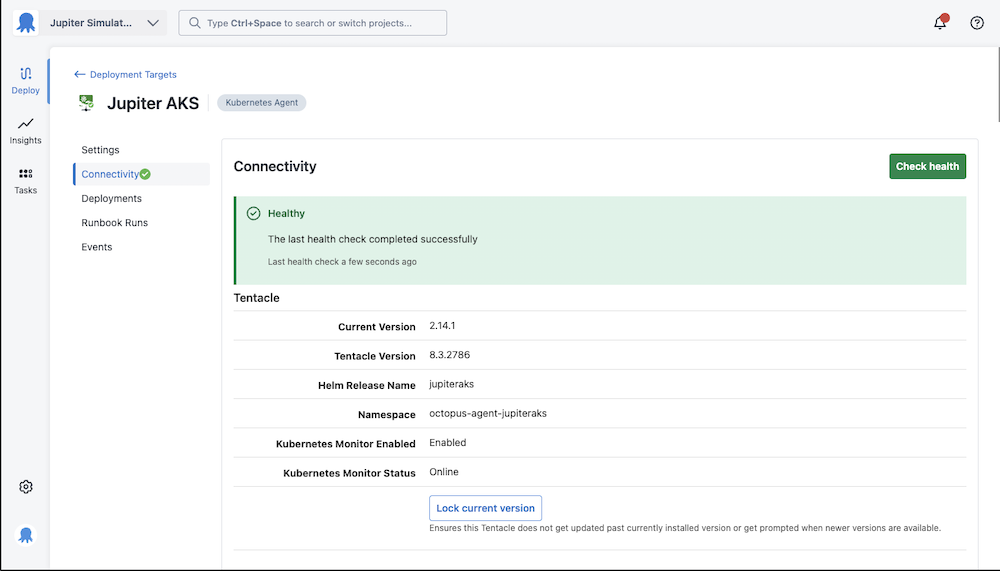
Once installed, you can confirm the status of the Kubernetes monitor by looking at the Connectivity page for the corresponding Kubernetes agent target.
Upgrading an existing Kubernetes agent
Coming soon, we are working on a one click upgrade process from within Octopus Deploy.
If you can’t wait until then, you can upgrade existing Kubernetes agents by running a Helm command on your cluster.
Find the following values and replace them in the Helm command below
| Value | Example | |
|---|---|---|
| INSTANCE_URL | The URL you access your instance with, without https:// or a trailing slash | my-instance.octopus.app |
| API_KEY | An API key for your user, created from your profile | API-MYKEY |
| SPACE_ID | The ID of the space your agent is installed in, find this in any Octopus url | Spaces-1 |
| AGENT_NAME | The name of the Kubernetes agent | My Agent |
| HELM_RELEASE | The name of the Helm release used to install the Kubernetes agent | myagent |
helm upgrade --atomic \
  --namespace "octopus-agent-$AGENT_NAME" \
  --reuse-values \
  --version "2.*.*" \
  --set kubernetesMonitor.enabled="true" \
  --set kubernetesMonitor.registration.serverApiUrl="https://$INSTANCE_URL/" \
  --set kubernetesMonitor.monitor.serverGrpcUrl="grpc://$INSTANCE_URL:8443" \
  --set kubernetesMonitor.registration.serverAccessToken="$API_KEY" \
  --set kubernetesMonitor.registration.spaceId="$SPACE_ID" \
  --set kubernetesMonitor.registration.machineName="$AGENT_NAME" \
  $HELM_RELEASE \
oci://registry-1.docker.io/octopusdeploy/kubernetes-agentUninstalling the Kubernetes monitor
If you need to disable the Kubernetes monitor temporarily, change the replica count to zero on the Kubernetes deployment called $AGENT_NAME-kubernetesmonitor in the Kubernetes Agent namespace.
If you need to permanently uninstall the Kubernetes monitor, then find the following values and replace them in the Helm command below
| Value | Example | |
|---|---|---|
| AGENT_NAME | The name of the Kubernetes agent | My Agent |
| HELM_RELEASE | The name of the Helm release used to install the Kubernetes agent | myagent |
helm upgrade --atomic \
  --namespace "octopus-agent-$AGENT_NAME" \
  --reuse-values \
  --version "2.*.*" \
  --set kubernetesMonitor.enabled="false" \
  $HELM_RELEASE \
  oci://registry-1.docker.io/octopusdeploy/kubernetes-agent